Tag: design-thinking

  • The Final Kick: How to Crush the Last Phase of Your Design Sprint

    The Final Kick: How to Crush the Last Phase of Your Design Sprint

    The finish line is in sight.

    After days of brainstorming, building, and refining, you’re approaching the last stretch of the Design Sprint. Just like the final leg of a race, it’s time to dig deep, make informed decisions, and sprint through the tape. Welcome to Phase 4: Test + Collect, where your prototype meets the real world and real users.

    “The ‘Test’ phase is the moment of truth in your Sprint journey. This is where your prototype faces the ultimate test — real-world user interaction and feedback.”

    Pattie Belle Hastings

    This week, my team entered the user testing phase of our digital prototype. It’s a nerve-wracking but rewarding part of the process. You finally get to see how users interact with the solution you’ve been working hard to create.

    Let’s break it all down so you can feel confident as you enter the final stages of your Design Sprint.


    Step 1: Research Lab

    Before jumping into user interviews, take time to prepare the environment for testing. In The Sprint Handbook: A Step-by-Step Guide to Planning and Running Innovation Sprints, Pattie Belle Hastings refers to this as the “Research Lab” phase.

    Here’s how to successfully prepare for user testing:

    • Define your target audience: Who is your prototype for? Be specific. The more tailored your users, the more valuable the feedback.
    • Determine number of participants: In Sprint: How to Solve Big Problems and Test New Ideas in Just Five Days, Jake Knapp, John Zeratsky, and Braden Kowitz recommend five participants. Why? It’s the sweet spot where patterns emerge without overwhelming your team.
    • Create a recruitment plan: Be clear and transparent. Reach out, explain what’s involved, and ask if they’re open to participating.
    • Handle the paperwork: If your tests are recorded, especially virtual ones, always send consent forms. Make sure participants understand it’s voluntary.
    • Schedule wisely: Confirm dates and times with your users. A defined schedule helps everyone feel prepared and respected.

    The moral of the story? Communicate, communicate, communicate with your user testers before starting the interviews.


    Step 2: Conduct the Interviews
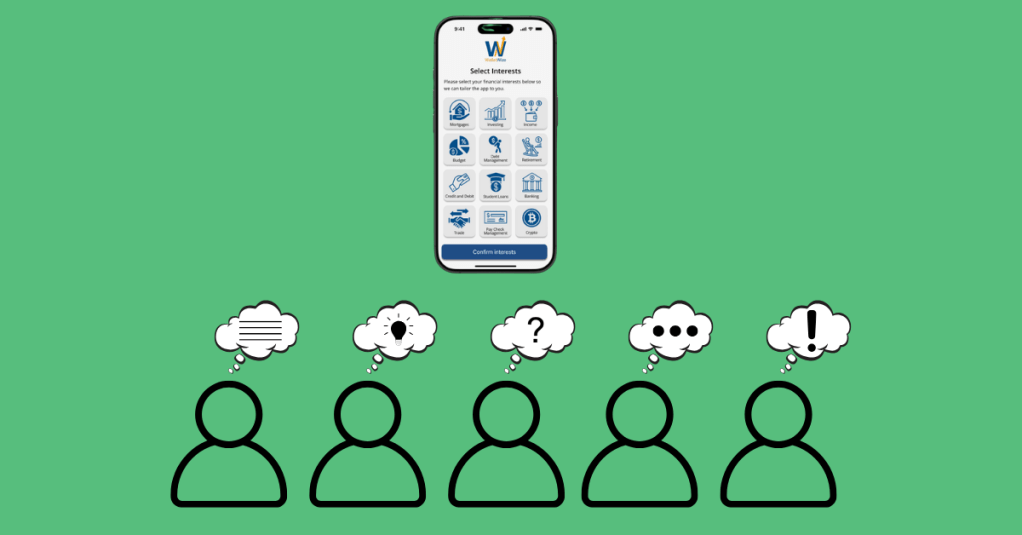
    Now that your team is prepared, it’s time for the interviews. This is where the magic happens, and where things can get emotional.

    “These interviews are an emotional roller coaster. When customers get confused by your prototype, you’ll be frustrated. If they don’t care about your new ideas, you’ll be disappointed. But when they complete a difficult task…you will be elated.”

    Jake Knapp, John Zeratsky, and Braden Kowitz

    User Scripts

    To keep things on track, follow a user script. This script keeps your team consistent and avoids giving the participants hints. The goal is to observe their authentic reactions and not guide them to the “right” answer.

    Knapp and his team suggest to start the user interviews with a friendly welcome to make the participant feel comfortable and at ease. Make sure to tell them that you are testing the prototype and not them. Ask open-ended background questions to learn about their experience and built trust. Introduce the prototype and present the tasks in a clear manner without giving hints. It’s important to end with a debrief and let the users reflect. Ask what they liked, what didn’t work, and how they would improve it. This uncensored feedback is gold.

    Tip: Stay Neutral and Curious

    Watching users struggle with your prototype can be hard. But that’s the point: your job isn’t to defend your work; it’s to learn from it.

    Here are some tips for a productive testing session:

    • Stay calm, even when users are confused.
    • Avoid giving explanations or answering questions they might have about completing a task.
    • Ask open-ended questions like:
      • “Why did you click there?”
      • “How did that feature make you feel?”

    Encourage participants to think out loud and resist the urge to jump in. Those moments of confusion are not failures; they’re opportunities to make your product even better.


    Step 3: Reflect with Your Team
    When all user sessions are complete, it’s time to analyze the results. Pattie Belle Hastings puts it best:

    “Analyzing the data from user testing in a Design Sprint is critical for deriving meaningful insights, identifying areas for improvement, and determining steps forward after the Sprint.”

    Pattie Belle Hastings

    During this debrief, your team should identify recurring patterns or problems, highlight areas where users were both confident and confused, review task completion rates and timing, observe users’ body language and facial expressions, and, if possible, collect both quantitative and qualitative feedback.

    You can write down observations in a shared document, on sticky notes, or on a digital whiteboard. When the insights are clear, schedule a check-out meeting to decide your next steps. Do you iterate on the prototype? Do you move forward with development? The decision will come from the evidence.

    To view my team’s user testing documentation and results, click here.


    Final Lap: Celebrate and Reflect

    You did it! Your team sprinted through ideation, prototyping, and testing. You gathered real feedback and now have a stronger sense of where your solution stands.

    So take a moment. High-five your team. Celebrate the collaboration and your hard work. Whether you nailed it on the first try or have adjustments to make, you’ve completed something meaningful.

    Cross that finish line strong.
  • The Art of Building Quick Prototypes: Phase 3 of Design Sprints

    The Art of Building Quick Prototypes: Phase 3 of Design Sprints

    You and your team are mid-race, and the stakes are rising. You’ve hit your stride, picked up steam, and now it’s time to execute. Phase 3 of the Design Sprint, Prototype and Refine, is all about collaboration and showcasing your strengths.

    At this stage, the ideas are there. Now, your job is to bring those ideas to life in a way that’s fast, intentional, and “good enough” for user testing. As Jake Knapp, John Zeratsky, and Braden Kowitz write in Sprint: How to Solve Big Problems and Test New Ideas in Just Five Days:

    “You’ve got an idea for a great solution. Instead of taking weeks, months, or, heck, even years building that solution, you’re going to fake it…To prototype your solution, you’ll need a temporary change of philosophy: from perfect to just enough, from long-term quality to temporary simulation.”

    Knapp, Zeratsky, and Kowitz

    That quote stuck with me, especially as someone who tends to chase perfection. The prototype mindset is about learning quickly. The goal is not to create a flawless product; it’s to simulate one realistic enough to gather feedback. So, how do you do that in just one day?

    Let’s break it down.


    Understanding Phase 3 Goals

    Pattie Belle Hastings outlines five key objectives in The Sprint Handbook: A Step-by-Step Guide to Planning and Running Innovation Sprints to guide the Prototype and Refine phase:

    • Rapid Realization: Quickly turn ideas into something tangible.
    • Focus on Critical Elements: Build only what matters most to test.
    • Prepare for User Testing: Design the prototype to gather useful feedback.
    • Resource Efficiency: Use the least amount of time and tools to get the job done.
    • Collaboration: Lean on each team member’s strengths to bring the product to life.

    “The prototype phase is the crucible where your ideas are forged into tangible forms, ready for real-world testing…It’s a creative endeavor that requires a blend of ingenuity, skill, and strategic thinking.”

    Pattie Belle Hastings

    This phase is where your team can shine. Focus on what matters most and continue the Sprint.


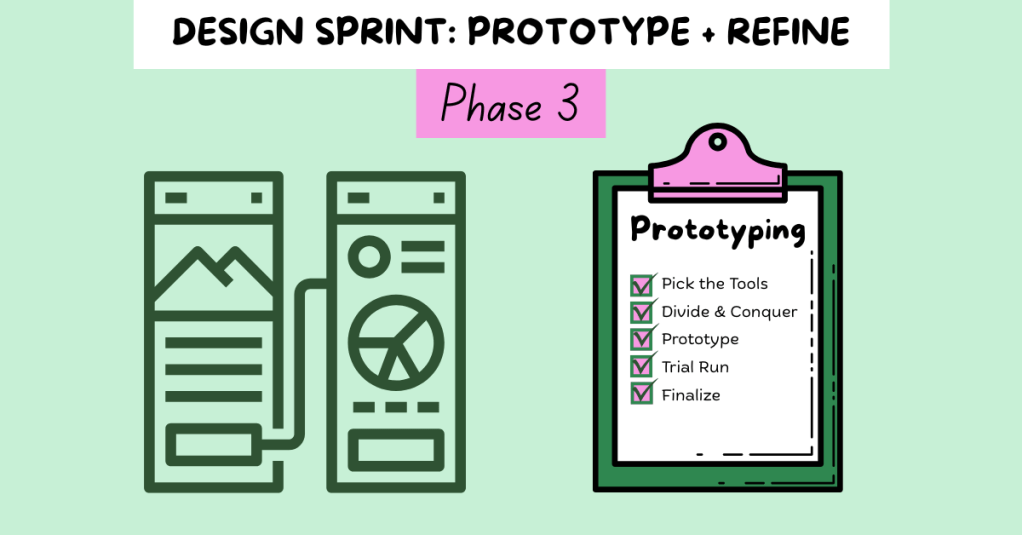
    Step 1: Pick the Tools

    Start by selecting your design tools. Depending on your team’s skills and project goals, you might choose:

    • Wireframes: Low-fidelity designs that outline structure
    • Mockups: High-fidelity visuals that simulate a real interface
    • Clickable Prototypes: Interactive designs that mimic real use
    • Functional Prototypes: Working products with built-in features

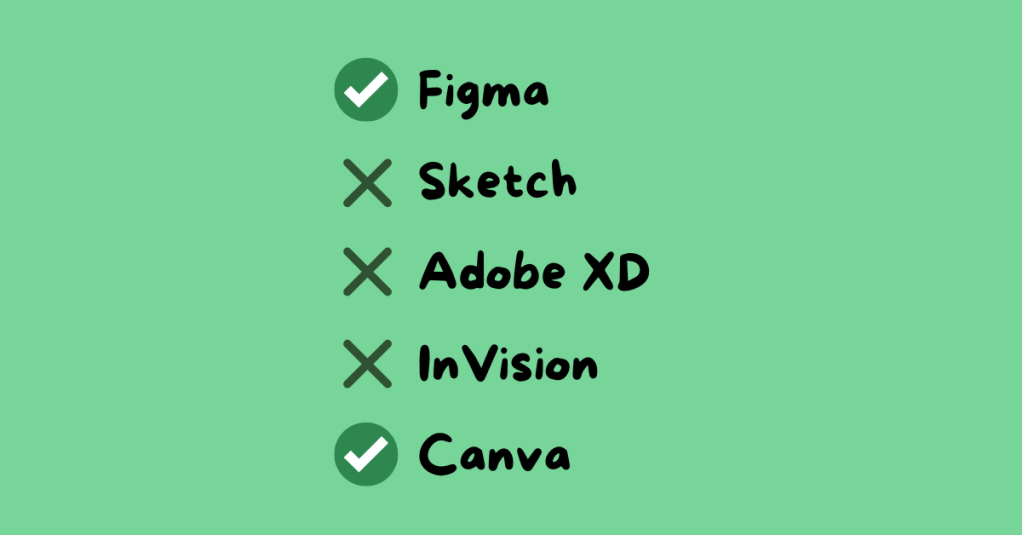
    Common tools include Figma, Sketch, Adobe XD, InVision, and Canva. For my team’s Gen Z personal finance app, we used Canva for wireframes and Figma for clickable prototypes. These tools matched our team’s skills and needs.


    Step 2: Divide and Conquer

    Time is limited, so efficiency is key. Assign roles based on experience and interest. Encourage each person to advocate for the role that best suits them.

    For our group, roles included:

    • Wireframe Creators: Sketched the app’s layout
    • Writer: Created on-screen text and instructions
    • Asset Collector: Gathered app content and visuals
    • Makers: Built the prototype in Figma
    • Illustrator: Designed custom icons and the app logo
    • Stitcher: Reviewed the prototype for consistency and flow

    I was assigned three roles: wireframing, illustrator, and stitcher. With a design background, I created the app’s logo and visual identity, and I reviewed all aspects of the prototype, including content, spelling, interactivity, and visuals, to ensure the finalized product was polished and ready to go.


    Step 3: Build the Prototype

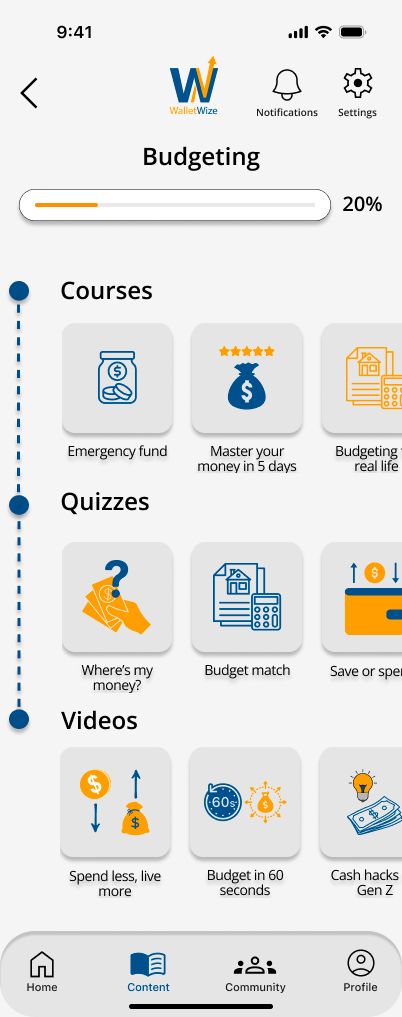
    The Budgeting Category screen in my group’s app.

    This is the heart of the phase. Using the storyboard from Phase 2, your team starts constructing the prototype. Make sure all team members are designing at the same fidelity level, review the prototype for consistency in design and functionality, ensure interactive elements align with the user flow, revisit Sprint objectives to stay focused, and prepare for user testing. The goal here is clarity, not perfection.

    Knapp, Zeratsky, and Kowitz assert that the prototype should look real enough that users believe it’s a functional product. This step will help the team learn about the areas of the product that work well and elements that require editing.


    Step 4: Conduct a Trial Run

    Before handing your prototype over to testers, test it internally. This gives your team the chance to identify confusing steps or design issues early. It is important to schedule a time for the entire team to conduct a trial run. Assign a group member to play the role of the user, gather feedback, and revise as needed.

    “Trial runs help your team fine-tune the prototype, identify potential issues, and ensure a smooth and effective testing session.”

    Pattie Belle Hastings

    Ask yourself: Does the product feel intuitive? Does the prototype reflect our Sprint goals? This step builds confidence and alignment before entering the final testing phase.


    Team Reflection: What Worked for Us

    This week, our team focused on communication, task alignment, and preparation. We clearly outlined roles, set deadlines, and checked in frequently. Having designated roles based on individual strengths helped us stay accountable and confident in our contributions.

    We also met virtually several times throughout the week, checked in with each other in our text group chat frequently, communicated early and often, and celebrated small wins along the way.

    One of the biggest lessons I learned this week? Don’t wait to speak up. If something is unclear, ask. If something’s off, say something. Holding yourself accountable while staying open to feedback makes a big difference in the pace and quality of your work.

    View my team’s wireframes and prototypes here.


    Final Thoughts: Eyes on the Finish Line

    This phase of the Sprint felt like the middle miles of a race. You’ve already started strong, and now you need to stay focused and finish strong. The prototype phase requires energy, attention to detail, and trust in your team.

    When it’s done right, it’s incredibly rewarding. You’re not just imagining your solution; you’re seeing it come to life.

    At this point, your product is ready to be tested. Keep your head up, keep your pace steady, and get ready for the next phase: testing with real users.

    The finish line is near.

  • Ready, Set, Sprint! A Guide to Preparing for a Design Sprint

    Ready, Set, Sprint! A Guide to Preparing for a Design Sprint

    Lining up at the start of a race, shoes double-knotted, heart racing, playlist queued. You’ve trained, fueled, hydrated, and mentally prepped. Everything’s ready because you know that when the sprint begins, there’s no time to second-guess. As a runner, I’ve learned that success doesn’t come from the starting gun. It comes from the work you put in beforehand.

    And that’s exactly how a Design Sprint works. No sneakers required.

    Just like a real sprint, preparing for a Design Sprint takes intention, strategy, and teamwork. Without proper preparation, the five-day process can feel chaotic instead of creative. With the right foundation, it’s a fast and focused way to solve big problems, prototype solutions, and gain meaningful feedback before investing time and money into full execution.

    Before we dive into how to prepare, let’s make sure we’re clear on what a Design Sprint actually is.


    So, What is a Design Sprint?

    Originally developed at Google Ventures, a Design Sprint is a five-day, structured process created to rapidly ideate, prototype, and test ideas. In Sprint: How to Solve Big Problems and Test New Ideas in Just Five Days, Jake Knapp, John Zeratsky, and Braden Kowitz break down this method:

    • Day 1: Understand and Define – Identify your long-term goal and clarify the problem to solve.
    • Day 2: Diverge – Sketch ideas individually before sharing with the group.
    • Day 3: Decide – Narrow down ideas and storyboard the best ones.
    • Day 4: Prototype – Build a quick, realistic version of the solution.
    • Day 5: Test – Gather feedback from real users to inform next steps.

    Pattie Belle Hastings, in The Sprint Handbook: A Step-by-Step Guide to Planning and Running Innovation Sprints, describes the Design Sprints as:

    “A human-centered approach to problem-solving that inherently promotes experimentation, embraces failures as learning opportunities, and encourages a deep understanding of ambiguity.”

    Design Sprints help you move quickly while staying focused, efficient, and user-centered, but they only work if you’re properly prepared.

    How do you set the stage for a successful and productive sprint?
    (Hint: it starts before Day 1.)


    Assembling the Right Team

    Just like a relay team needs a strong mix of speed, endurance, and strategy, your sprint team needs a balance of skills and perspectives. According to Knapp, every sprint should include:

    • The Decider – the final decision-maker.
    • The Facilitator – keeps the team on track and energized.
    • The Designer – visualizes and prototypes ideas.
    • The Voice of the Customer – represents the user’s perspective.

    A good way to match people to these roles? Try building a Personal User Manual.

    “Personal User Manuals are most effective when they are short, succinct, and scannable. Ideally they should fit on a single page and the text should be active and engaging.” – Anna Brown

    In her article “What is a Personal User Manual?,” Anna Brown explains that these one-pagers include your background, working style, communication preferences, strengths, and even what frustrates you. It’s a powerful tool for fostering empathy and building psychological safety on a team, which are both crucial for Design Sprints to thrive.

    In “A Personal User Manual for Working With Me,” Luke Thomas adds that user manuals help accelerate relationship building with your team while reducing ambiguity at work. Not sure where to start? Try Thomas’s suggested prompts like:

    • “An ideal day at work is…”
    • “My superpower is…”
    • “How I like to give and receive feedback…”

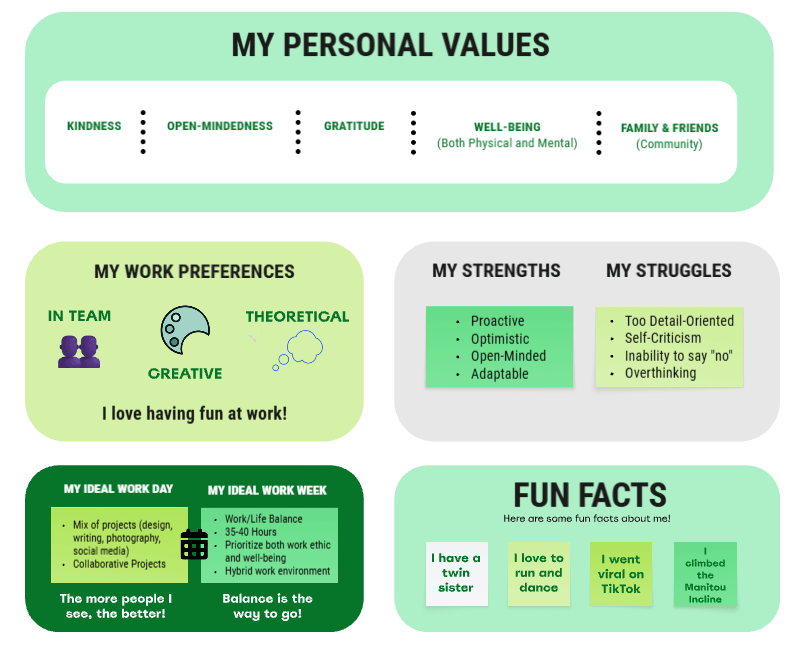
    For inspiration, take a look at a section of my personal user manual below that I created on Miro.


    Choosing the Right Challenge

    Once your team is in place, the next step is defining the challenge. And no, it shouldn’t be a safe or easy one. Knapp encourages teams to “go after their most important problem…don’t go for the small win” (Knapp, 2016, p. 27).

    Design Sprints are built to tackle tough questions: the ones that carry risk and reward. Think of it like choosing to run a marathon instead of a 5K. The stakes are higher, but so are the breakthroughs.

    Focus on the problem that will make the biggest impact, even if it feels daunting. The structure of the sprint gives your team the support to take bold leaps.


    Why Sprint?

    Still wondering why you’d take the time for a Design Sprint? Hastings outlines several benefits:

    • Speeds up product development
    • Builds collaboration across teams
    • Surfaces user feedback early and often
    • Drives better decision-making
    • Boosts morale and creativity

    Design Sprints encourage experimentation without fear. They give you a playground to test ideas and fail forward before stakes get too high.


    Final Thoughts

    Design Sprints might not require running shoes, but they do require preparation and a strong sense of direction. Much like training for a real race, the goal is to do the groundwork before the big event, so that once you start, you can focus on performance, not uncertainty.

    So lace up (figuratively), build your team, write your user manuals, identify your mountain to climb, and when you’re ready…sprint.

  • Unlocking Creativity: Exploring the Ideation Phase in Design Thinking

    Unlocking Creativity: Exploring the Ideation Phase in Design Thinking

    Creating an App: The Beginning Phase

    This week, I was presented with a thought-provoking question: How do you create an app? And where do you start? As part of my graduate class on Ideation, Prototyping, and Testing, I was challenged to explore the beginning stages of app development. Until now, I had never considered creating my own app. Faced with this creative challenge, I wondered: Where do I begin?

    I started by diving into the Ideation phase of the Design Thinking Process. This stage is all about generating ideas – the good, bad, and everything in between – to identify potential solutions to a problem. Through research, I discovered various Ideation techniques, including Brainstorming to Worst Possible Idea to Mind Mapping, and more. Ultimately, I decided to experiment with three techniques: Braindumping, Mind Mapping, and Sketchstorming. Here’s how each method shaped my app idea.

    My Ideation Phase of Creating an App

    Braindumping: Getting Every Idea on the Table

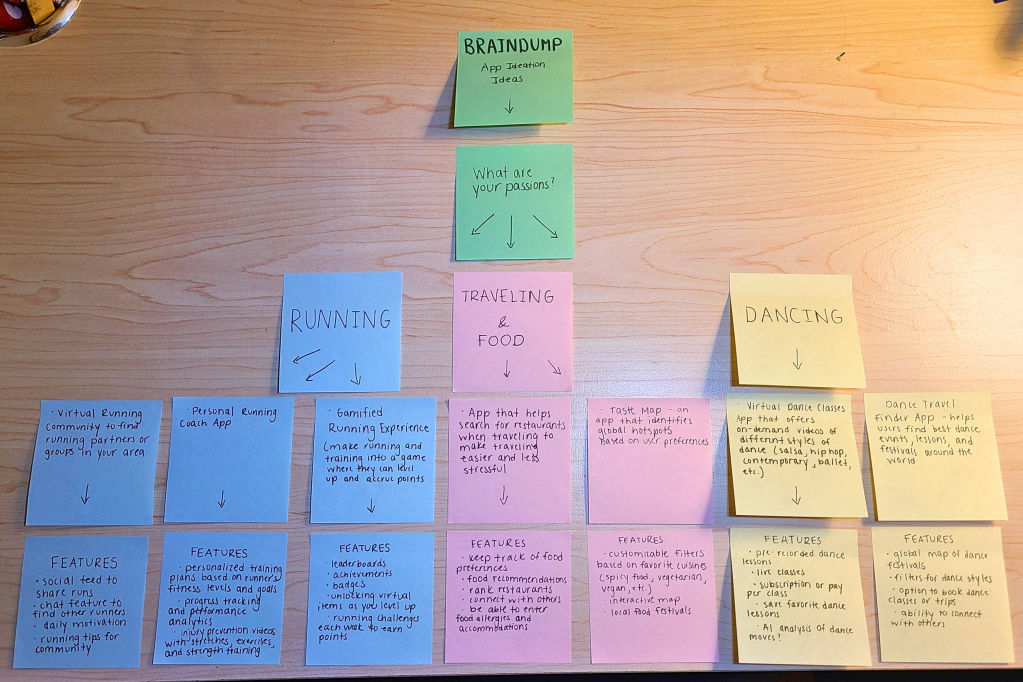
    I began with Braindumping, a technique that involves writing down ideas freely without judgment or filtering. Using sticky notes, I jotted down responses to key questions: What are my interests? What do I look for in an app?

    This exercise helped me identify four core interests: running, traveling, food, and dancing. I then brainstormed potential apps for each category.

    • Running: A platform to connect with local runners or a personal coaching app.
    • Dancing: A virtual dance studio offering live and pre-recorded lessons.
    • Traveling & Food: An app that helps users find restaurants based on dietary preferences and allergies.

    One idea resonated with me the most: an app that combines food and travel to help users find restaurants based on dietary restrictions. This concept stemmed from a personal experience with my mom; she follows a gluten-free diet and often struggles to find suitable dining options. With this in mind, I moved to the next phase: expanding the idea through Mind Mapping.

    Mind Mapping: Structuring the Concept

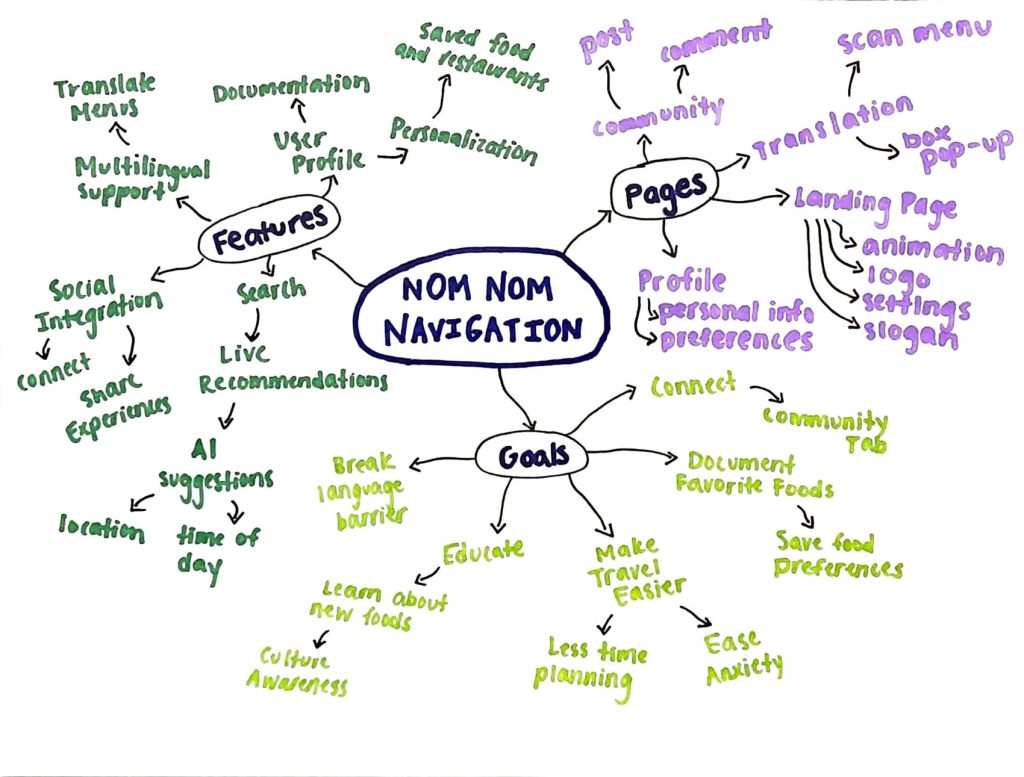
    To further develop my idea, I created a Mind Map, a technique where a central theme branches out into subtopics and related concepts. At the center of my map was the core idea: A restaurant-finding app for dietary preferences. From there, I created branches to explore the app in more detail:

    • App Features
    • Pages/Tabs
    • Goals

    Mind Mapping allowed me to see the app’s potential features at a glance, providing clarity on what to include in some potential mockups. This led me to explore the Sketchstorming technique.

    Sketchstorming: Bringing the Idea to Life

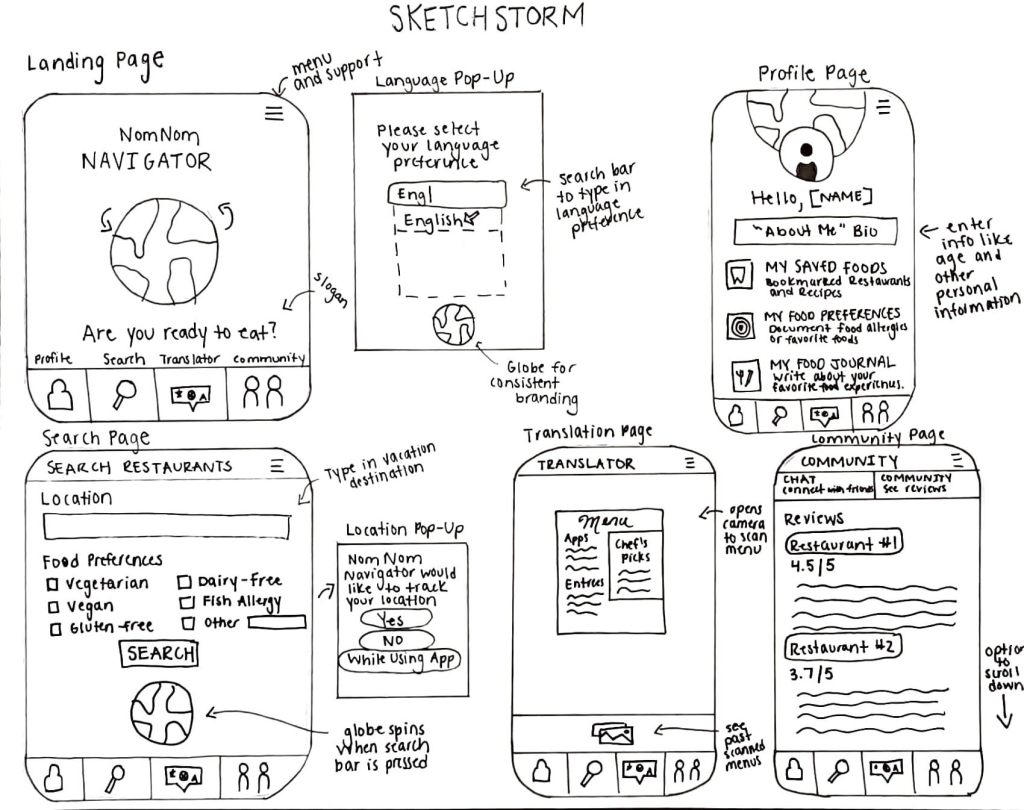
    Sketchstorming involves quick, rough sketches to conceptualize a product’s interface and layout. I began by sketching the app’s landing page and main tabs:

    • Profile: Where users input their dietary restrictions.
    • Search: A customizable restaurant-finding tool.
    • Translation: A language-assist feature for travelers.
    • Community: A space for users to share restaurant recommendations.

    Sketching helped me visualize the user experience, making the app feel more tangible. I realized that combining ideation techniques – starting broad with Braindumping, refining ideas through Mind Mapping, and visualizing them with Sketchstorming – was instrumental in shaping my concept.

    Reflections and Next Steps

    This was my first time formally using the Design Thinking Process, and it was both challenging and rewarding. By exploring multiple ideation techniques, I gained a deeper understanding of how to refine an idea and bring it to life. Moving forward, I’m excited to continue to study the Design Thinking Process.

    Have you ever used an Ideation technique? I’d love to hear how you approach creative problem-solving!