Background Image of Pickering Valley Golf Course
How many apps do you use per day? Now, think about the ones you use most often. Why do you keep coming back to them? Chances are, they’re intuitive, easy to navigate, and provide the information you need without frustration. On the flip side, if an app is cluttered, confusing, or just plain frustrating, you probably close it and move on.
Designing an app isn’t just about making something look good – it’s about creating a user-centric experience where every feature and piece of content is carefully chosen. That was my challenge this week: designing a companion app for the Schuylkill Township website that balances functionality, accessibility, and ease of use.
Choosing the Right Content for an App
Not all website content needs to be included in an app. In fact, trying to squeeze too much information into an app can backfire, making navigation overwhelming. So, I started by asking myself two key questions:
- Should all website content be available on the app?
No. Overloading an app with too much content can create clutter and unnecessary complexity. - What information would be most useful to users?
As I researched municipal apps and user behavior, I found that residents primarily use these apps to stay informed and access services quickly. The most sought-after features include news and alerts, event updates, service requests, and contact information (civiclive.com; civicplus.com; townweb.com). My goal was to strike a balance between offering essential information and keeping navigation streamlined.
Key Features of the Companion App
After considering these factors, I structured the app around a home screen and five main sections, each designed to improve user experience and efficiency:
1. Home Screen
The home screen serves as the app’s hub, featuring:
- A header with the township logo, search bar, settings for language preferences, and a ‘Make a Payment’ button.
- A background image of the township for a welcoming, familiar touch.
2. News & Alerts
- Displays recent news articles and important alerts.
- A search function to find specific articles.
- A ‘Read More’ option linking to the full website for further details.
3. Events
- A calendar view of upcoming township events.
- Ability to filter events by category (e.g., community meetings, recreational activities).
- Option to set reminders or add events to a personal calendar.
4. Township Services
This section provides quick access to essential services:
- Public Safety (police, fire department, emergency contacts).
- Trash & Recycling Schedule.
- Permits & Licensing.
- Tax Information.
5. Report an Issue
- Residents can report problems like potholes, streetlight outages, or stormwater issues.
- A category for “Other” issues, where users can write about their issue and upload an optional photo.
6. Township Directory
- Contact details for township offices, emergency services, and elected officials.
7. More
- Links to the township’s website and social media pages to encourage community engagement.
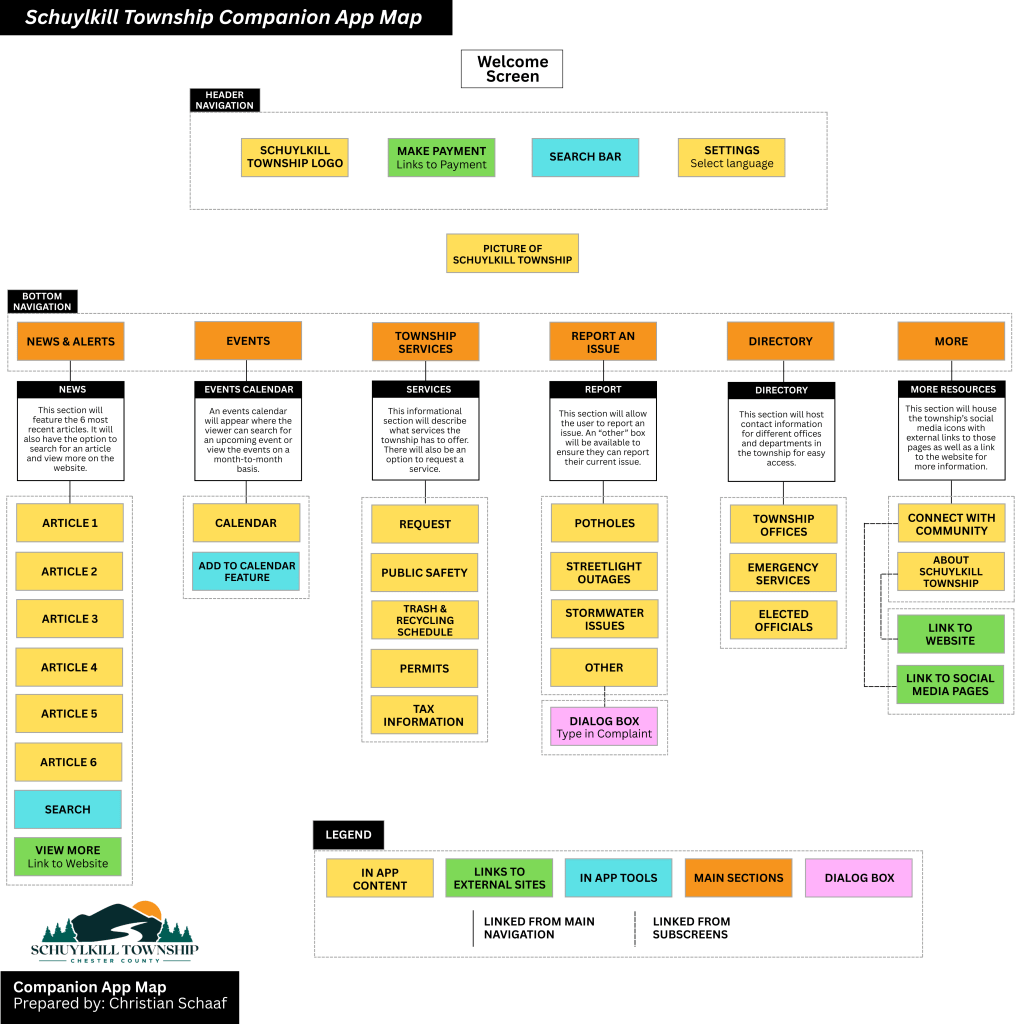
My proposed companion app for Schuylkill Township.
Click here to read more about my companion app creation.
Bridging the Gap Between Website & App
This companion app isn’t meant to replace the website – it’s designed to complement it. The website remains the primary source for comprehensive township information, while the app focuses on real-time updates and quick access to services. By strategically selecting what content to include, I ensured that the app remains lightweight, user-friendly, and functional.
Lessons Learned in App Information Architecture
This project reinforced some important lessons in mobile UX design and information architecture:
- Simplicity is key – Overloading an app with content leads to confusion; prioritization is crucial.
- User behavior should guide design – Understanding why residents visit municipal sites helped shape the app’s structure.
- Navigation should be effortless – A clear, well-organized layout enhances usability and efficiency.
- Consistency between web and app experiences matters – While the app offers streamlined content, it still aligns with the website’s overall branding and structure.
Final Thoughts
Creating this app was a fascinating dive into the balance between accessibility, usability, and design. It challenged me to think critically about how users interact with information and how to optimize their experience. By focusing on essential content, intuitive navigation, and quick access to vital services, this app aims to make township information more accessible than ever.
 Christian Schaaf's Blog + Portfolio